The best digital marketing software for contractors is the one that turns into measurable calls, forms, and booked jobs because it is actually implemented, automated, and tracked end to end.
Here is what matters most when you choose contractor marketing software:
- Start by defining a lead as a call, a form, or a booked job.
- Competitor and market analysis prevents you from copying what already fails locally.
- Funnels only work when follow up is automated, not manual.
- Local visibility improves when listings and reviews are actively managed.
- Paid ads scale only when calls and forms are tracked to the same report.
- Software ROI stays unclear without dashboards that tie spend to outcomes.
- Onboarding and an account manager matter more than an extra feature you will not deploy.
At Web Rank Digital, we built the National Customer Accelerator for this exact scenario: you want predictable lead flow, but you are done stitching together disconnected apps. Our system combines the Competitor Analysis System, automated funnels, and dashboard reporting so you can run acquisition like an operator, with guided onboarding so it goes live instead of sitting idle. Before you compare the 25 options, you need to decide what you will measure, because the “best” platform is the one that proves it is producing calls, forms, and booked jobs.
Before you pick software, decide what you will measure
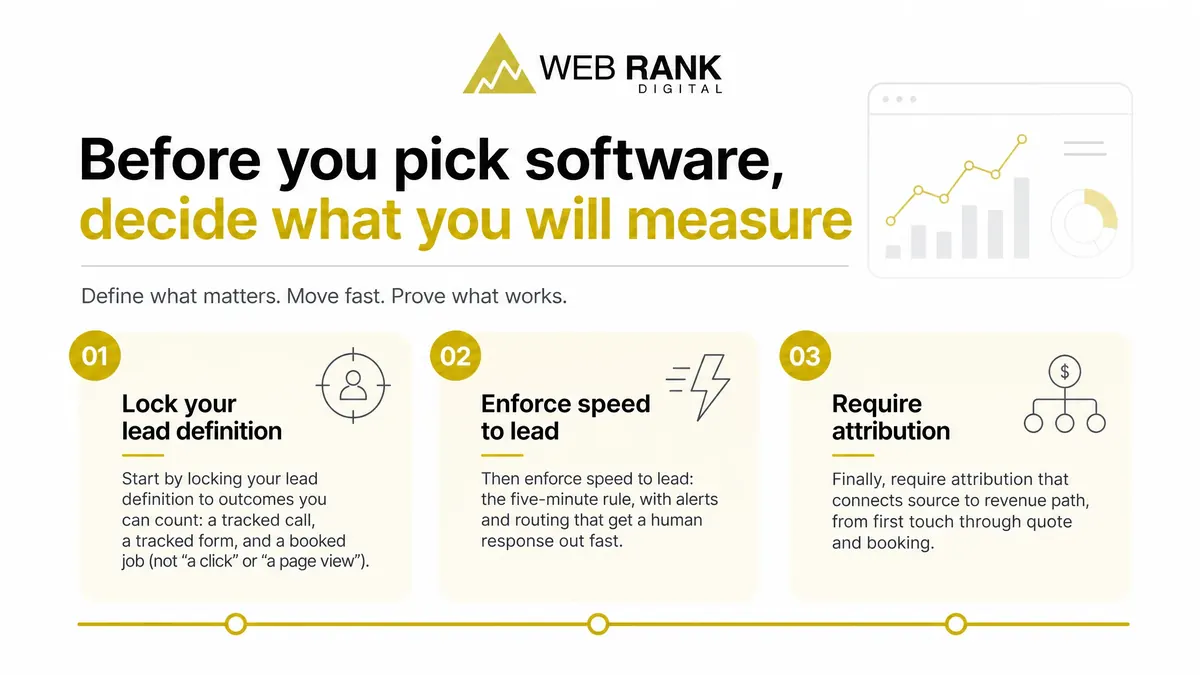
If you cannot define a lead and prove where it came from, you will keep paying for tools that feel busy but do not produce contractor revenue. Start by locking your lead definition to outcomes you can count: a tracked call, a tracked form, and a booked job (not “a click” or “a page view”). Then enforce speed to lead: the five-minute rule, with alerts and routing that get a human response out fast.
Finally, require attribution that connects source to revenue path, from first touch through quote and booking.
1. Web Rank Digital National Customer Accelerator
National Customer Accelerator is built for contractors who want an end-to-end acquisition system that actually gets implemented, not another tool that sits half-configured. You get trackable funnels that capture and follow up on leads, plus dashboards that show calls, forms, and booked-job outcomes in one view so routing and attribution do not break.
It starts with competitor analysis using market gap mapping, so you target under-served job types and service areas instead of copying crowded keywords. Onboarding includes a dedicated account manager to run setup with you, keep the build consistent, and move you from launch to weekly optimization.
2. HubSpot Marketing Hub
HubSpot Marketing Hub is the baseline marketing automation suite most contractors compare against because it can run serious email nurturing, workflow logic, and form capture in one place. The upside is control: you can build multi-step follow-up after a form fill, route leads by service line, and trigger emails based on behavior.
Where HubSpot really wins is the CRM and reporting ecosystem. When your pipeline, campaigns, and attribution are configured cleanly, you can see which forms, emails, and sources produced qualified opportunities and closed revenue.
The tradeoff is implementation and admin load. To make it work for home services lead flow, you typically need consistent field naming, lifecycle stages, lead routing rules, integration to call tracking and calendars, and ongoing list hygiene. Without an owner, it becomes an expensive database, not a booked-job engine.
3. Housecall Pro
Housecall Pro is operations-first software: it keeps your job pipeline, dispatching, and scheduling tight, so leads turn into booked work with fewer handoffs. Where it goes far enough for follow-up is around estimates, with automated reminders that push pending quotes back in front of the customer so you do not lose deals to delay.
Where it usually stops is acquisition measurement. You can track activity and outcomes inside the platform, but you will not get deep marketing analytics like channel-level attribution, keyword-to-job visibility, or competitor-driven opportunity insights without layering in separate reporting.
4. Birdeye
Birdeye is enough when your problem is conversion on existing demand, not lead volume. It helps you send automated review requests after a job, then keep your major listings in sync so your name, address, phone, and hours stop drifting across directories. You also get reputation insights and a single place to respond fast, which protects your star rating and shows prospects you are active.
The limit is simple: it is not a full funnel. It will not create new search demand or drive booked calls without separate acquisition channels feeding it.
5. ServiceTitan
ServiceTitan is an ops-first platform you buy when you want tighter control of dispatch, job flow, and reporting. It can help you route calls, manage schedules, and push consistent booking workflows, especially when you need visibility from first call to completed invoice.
What it does not replace is customer acquisition. You still need separate engines for SEO and PPC to create demand and drive new leads. Treat ServiceTitan as your system of record for execution and measurement after the phone rings, not the tool that makes it ring.
6. Jobber
Jobber is strong for running the job once the lead is already yours. You can keep customer records organized, assign techs, and manage scheduling so dispatch stays clean as volume grows.
On the money side, it supports quotes and invoices with a clear approval flow, which reduces back-and-forth and speeds up billing.
Where contractors get stuck is predictable lead volume: Jobber is not a lead generation engine. For steady new calls and form fills, you still need external channels like SEO, paid search, and automated follow-up tied to attribution.
7. Podium
Podium is built for speed-to-lead, which is often the deciding lever when you and two other contractors are bidding the same job. You get two-way text and web chat so a new inquiry can turn into a live conversation without waiting for a callback, plus missed-call text-back workflows that keep leads from going cold when your team is on-site. The tradeoff is simple: messaging converts demand, but it does not create it.
You still need acquisition sources feeding the inbox.
8. CallRail
Call tracking is how you stop paying for “leads” and start paying for jobs. CallRail gives you attribution across SEO, PPC, and LSAs by using dynamic number insertion: your site shows different phone numbers based on the traffic source, so each call is tied back to the channel that generated it.
Recordings and lead tagging are where volume turns into quality control. You can listen for price-shoppers vs service-ready callers, tag outcomes (booked, estimate, spam), and feed cleaner reporting into your decisions.
The limit: CallRail is not funnel automation. It measures and qualifies calls, but it will not run your follow-up sequences for you.
9. Google Analytics 4
GA4 can prove which channels and landing pages produce tracked leads, but it cannot prove revenue or real ROI for a contractor unless you connect calls and booked jobs back into analytics. You should at minimum track form submits as events, and treat phone calls as conversions only when you have call tracking that passes source data into GA4. Channel reporting is only as clean as your UTMs, so you need consistent tagging for Google Ads, Local Services, email, and any partner traffic.
Without offline conversion import from your CRM, attribution stops at the lead, and “winning channels” can be the ones generating unqualified calls.
10. Google Ads
Google Ads only pays off for contractors when you run it like an operating system for intent capture, not a “set it and forget it” channel. Urgent services win because you can bid on high-intent searches like “emergency plumber” or “furnace repair near me” and route those clicks straight to calls.
ROI stays invisible without clean conversion tracking. We push for call tracking, form tracking, and Enhanced Conversions so your CRM-matched leads are counted and you can optimize to booked jobs, not just clicks.
Your fastest way to burn budget is skipping negative keywords. Without them, you pay for “DIY,” “jobs,” “salary,” “free,” and out-of-area searches that never convert.
11. Google Local Services Ads
Google Local Services Ads (LSAs) are often the fastest path to phone calls for eligible trades because you pay per lead, not per click. You set a weekly budget and get charged when Google delivers a call or message lead, so true cost comes down to lead quality and how many turn into booked jobs. Dispute workflows matter: you need tight intake notes and fast follow-up, because slow responsiveness burns leads you still pay for and makes disputes harder to win.
Eligibility is category-specific, and onboarding typically includes business verification plus license and insurance checks before you can run.
12. Meta Ads Manager
Meta Ads Manager works best for contractors as demand capture support, not as your primary lead engine. Lead forms are frictionless and cheap, but they attract more low-intent tire kickers, so you need tight qualifying questions and fast speed-to-lead. Landing pages cost more per click, but they usually produce cleaner requests because you control the story, proof, and next step.
Where Meta shines is remarketing estimate shoppers who visited pricing or quote pages. Do not run this without follow-up automation: instant text, call tasks, and a 5 to 10 minute response window.
13. Unbounce
Unbounce is a landing-page-first pick when your PPC is driving clicks but your site is too slow or too rigid to convert them. You can ship fast pages and run clean A-B tests on headlines, offers, and form layouts without waiting on a full site release, which is where most contractor campaigns stall. Where it gets operational is lead routing: send form fills straight into your CRM or automation so speed-to-lead stays tight.
The limit is reporting depth. You will not get a full attribution stack end to end without additional analytics and pipeline tracking.
14. Leadpages
Leadpages is built for getting a conversion-focused landing page live fast, without a long build cycle or heavy dev support. You work from template-driven pages and popups (including opt-in and announcement-style overlays), so a small team can publish, collect leads, and iterate without rebuilding layouts from scratch.
Integrations stay straightforward: connect common email and CRM tools, and use webhooks when you need to pass form fills into your own systems or a middleware workflow. The tradeoff is depth of testing versus simplicity. You can run basic experiments, but if you need advanced test design and granular routing logic, you may outgrow it.
15. WordPress with contractor theme stack
WordPress with a contractor theme is a common DIY path because you own the site, control your content, and can switch hosts or vendors without rebuilding from scratch. The catch is that results rarely hinge on the CMS. They hinge on structure and upkeep.
Theme bundles often turn into plugin sprawl, and one missed update can break forms, speed, or security. You also still need real setup for SEO architecture (pages, internal links, schema) and tracking (calls, forms, booked jobs), plus ongoing maintenance so reporting stays accurate.
16. Webflow
Webflow is a modern builder contractors pick when you care about speed and tight design control without the typical plugin bloat. You can ship clean, lightweight pages and dial in layouts to match high-intent services, which helps performance and conversion.
SEO is straightforward for the fundamentals: editable titles and meta descriptions, clean URL structure, 301 redirects, and structured CMS collections so you can scale service pages and location pages with consistent on-page fields.
The tradeoff is operations. Meaningful changes often require a skilled operator, and handoff can stall if your team expects WordPress-style self-edits or a simple SEO publishing workflow.
17. Semrush
Semrush is strong when you want proof of where leads should come from: competitor keywords, content gaps, and rank tracking by location. You can see which service pages and blog topics competitors win on, then track your own movement weekly instead of guessing. Its site audits also surface technical blockers (crawl issues, speed, broken links) and give local SEO inputs like on-page signals and listings visibility.
The drawback is execution: Semrush shows the work, but it will not implement fixes, write pages, or earn local authority without your team or an agency.
18. Ahrefs
Ahrefs is strongest as a competitor and backlink intelligence suite, which supports contractor lead flow indirectly by telling you why other sites outrank you and what links and pages are driving it. You use backlink research to spot the referring domains you could realistically earn, and content gap tools to find service and location topics competitors cover that you do not. Rank tracking and site audits help you monitor movement and surface technical issues, but it will not execute fixes.
You still need consistent content production and technical cleanup to turn insights into calls.
19. BrightLocal
BrightLocal is built for the map pack outcomes you care about: where you rank by ZIP and how that visibility turns into calls. You use its local rank tracking and audit views to spot slippage in core signals like category relevance, proximity targeting, and listing consistency before call volume drops.
On citations and listings management, BrightLocal helps you find duplicates, wrong NAP, and missing directory coverage that can dilute Google Business Profile trust. It performs best paired with a review system, because you can correlate ranking lifts with review velocity and sentiment, then prioritize the locations that will convert calls into booked jobs.
20. Whitespark
Whitespark is a local SEO specialist tool you reach for when your visibility problem is listings accuracy, not lead capture. It is built for citation building and cleanup, so your NAP data stays consistent across directories and you can remove duplicates that confuse Google and suppress map rankings. For multi-location contractors or anyone fighting a competitive metro map pack, Whitespark also gives you local pack tracking options to monitor rankings by location and keyword.
It is not a lead funnel tool, so pair it with your core acquisition system for calls and follow-up.
21. Mailchimp
Mailchimp fits once you already have lead capture and want consistent email follow-up without building a full marketing stack. For contractors, it is strong for newsletters and basic automations like welcome sequences, estimate follow-ups, and service reminders that keep your brand present between jobs.
It also works well for customer reactivation campaigns, where you segment past clients and run seasonal or maintenance-driven outreach to bring dormant accounts back into the calendar. The limit is sales pipeline visibility: Mailchimp can send and trigger emails, but it will not give you clean stage-by-stage deal tracking or rep activity the way a CRM-focused system does.
22. Brevo
Brevo is strong when you need reliable email and SMS automation that keeps follow-up consistent across estimates, missed calls, and repeat service reminders. You can run nurture sequences and time-sensitive texts without building a complex stack.
It also supports transactional messaging, which matters when you want confirmations and real-time updates to send cleanly and on schedule, not from a manual inbox.
The catch is measurement and handoff: you still need solid CRM integration for lead status, tagging, and routing, plus attribution connections so you can tie campaigns to calls, forms, and booked jobs.
23. ActiveCampaign
ActiveCampaign is built for teams that will actually design automation, not just send newsletters. You can segment by behavior and tags, then trigger multi-step workflows that route leads, change follow-up based on actions, and keep sales and marketing in sync.
For contractors, the CRM-lite pipeline can work as a simple deal board for estimates and booked jobs, but it is not a full field-service CRM.
Plan for real setup and upkeep: initial tag and event naming, form and site tracking, workflow QA, and ongoing maintenance when services, offers, or intake questions change.
24. Zapier
Zapier can connect the gaps in your stack fast: a form submission creates a CRM lead and triggers an SMS, without a custom build. That is the upside. The cost is fragility.
Zaps fail when a form field gets renamed, a CRM permission changes, an API token expires, or you hit task limits, and you usually learn after leads stop flowing. Plan for monitoring: error alerts, daily spot checks, and a clear owner for fixes. Use Zapier to bridge missing native integrations, not as your core operating strategy.
25. Clio Grow
Clio Grow is a law-firm growth platform, and it shows in what it optimizes: legal intake and a pipeline from lead to retained client. It is built to capture case details, qualify matters, and keep attorneys moving prospects through a structured intake process.
Where it gets strong is automation around consultations, like scheduling, reminders, and follow-up sequences that reduce no-shows and keep prospects engaged before they sign.
For field services, this is a category mismatch. You need job-type and service-area routing, dispatch-aware booking, and quote-to-job attribution, not a legal intake workflow.
How to choose your contractor stack in 30 minutes
Avoid paying for software that “runs” but never produces attributable contractor leads by using a 10-point scorecard: 1) analysis (call, form, and booked-job attribution), 2) funnels (capture, follow-up automation, handoff), 3) SEO (local visibility and lead capture paths), 4) PPC (keyword control plus conversion tracking). Then run a proof test: demand a live dashboard walkthrough showing one lead moving from ad or search to call or form to tagged revenue. Finally, run a support test: confirm your account manager cadence, weekly for the first month, then at least monthly optimization reviews.
If you want the fastest validation, book a National Customer Accelerator demo and ask for that exact walkthrough.
See your lead flow working before you commit
If you are tired of paying for tools that never turn into steady calls and booked jobs, you do not need another disconnected app. You need a contractor lead workflow you can validate end to end, with routing, automation, and reporting that stays consistent week to week.
Book a National Customer Accelerator demo with us at Web Rank Digital. We will walk you through competitor and market analysis, a contractor-specific lead capture and follow-up funnel, and the dashboard you will use to track calls, forms, and booked outcomes. You will leave the demo knowing exactly what gets implemented, what gets measured, and where leads are leaking.
If the workflow checks out, the next step is simple: start onboarding with your assigned account manager so the system goes live cleanly and keeps improving.