The best competitor analysis tool for a local business is the one that tracks map pack performance and heatmap tracking, then turns competitor moves into a short weekly action list.
Here’s what matters most when you are choosing a local competitor intelligence tool:
- Start with the map pack, because that is where local leads are won.
- Use gap detection across keywords, content, and backlinks to find fast opportunities.
- Prioritize real-time monitoring so competitor publishing and ranking changes do not surprise you.
- Choose shareable reports plus scheduled reporting so the work is easy to communicate.
- Run a 30 minute test with a one page scorecard to avoid tool regret.
We built our National Customer Accelerator Competitor Analysis System for this exact gap: competitor intelligence that does not stop at dashboards. You get real-time monitoring, actionable playbooks, and shareable reports, plus onboarding and an account manager, so you can execute five clear improvements each week or plug the insights into Local SEO by Web Rank Digital when you want implementation help. Next, we will break down quick picks by local use case so you can match the right tool to how you actually compete.
Quick picks: the best tools by local use case
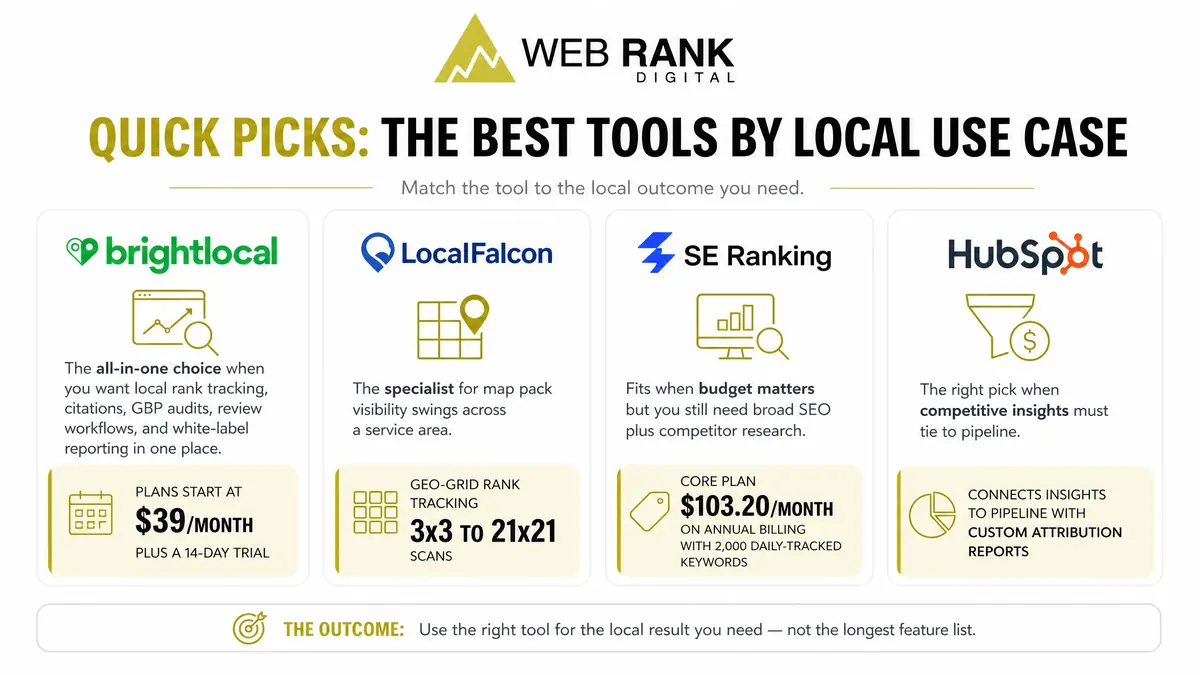
You avoid picking the wrong tool by matching it to the local outcome you need, not the longest feature list. BrightLocal is the all-in-one choice when you want local rank tracking, citations, GBP audits, review workflows, and white-label reporting in one place (plans start at $39/month, plus a 14-day trial).
Local Falcon is the specialist for map pack visibility swings across a service area. Its geo-grid rank tracking runs 3×3 to 21×21 scans so you can see where you are visible, where you disappear, and which competitor replaces you.
SE Ranking fits when budget matters but you still need broad SEO plus competitor research; its Core plan is $103.20/month on annual billing with 2,000 daily-tracked keywords.
HubSpot is the right pick when competitive insights must tie to pipeline; HubSpot’s revenue attribution helps you connect channels to deals, not just rankings.
What should we look for in a competitor analysis tool?
To avoid paying for data you cannot use, insist on exports and scheduled reporting that match your weekly cadence and let you share the same view internally or with a client.
Also confirm seat limits and client access upfront. A tool that locks insights behind one login turns “monitoring” into bottlenecks and missed follow-through.
Local signals that predict calls
For local service businesses, the most useful competitor data ties directly to call-driving visibility in the map pack, not broad market charts. You want signals that explain why a rival is winning the click in your service area.
Start with Google Business Profile fundamentals: competitors’ primary category and the specific services they list often align tightly with what Google chooses to rank. Whitespark’s 2026 ranking factors survey puts GBP signals at 32% of local pack ranking weight and review signals at 20%, so a tool that cannot parse these details leaves you guessing.
Finally, map rank must be neighborhood-specific. One “average position” hides the reality that you can be top 3 downtown and invisible five miles east.
- GBP categories and services: see what competitors lead with and what service entries they use to match high-intent searches
- Review velocity and rating gaps: track who is gaining reviews fastest and where your rating or volume is materially behind
- Map rank by neighborhood: geo-grid or heatmap-style views that show where competitors dominate, street by street
Competitive insights we can act on
You are buying decisions, not observations. The best competitor analysis tool for local businesses turns findings into a short list of changes you can ship this week.
Look for visibility into competitors’ top pages driving local traffic so you can see the exact service pages, location pages, or guides pulling demand. Then validate citation consistency by source, because a mismatch on a major directory can suppress map performance even when your website work is strong.
Keyword gaps must be intent-filtered. “Near me,” service-plus-city, and emergency terms are where calls come from; informational gaps are optional.
- Top pages driving local traffic: identify which competitor URLs earn rankings and what page types they use (service vs. location)
- Citation consistency by source: pinpoint which directories have incorrect NAP details for you versus competitors
- Keyword gaps with intent: find terms competitors rank for in the top results that map to booking or calling behavior
This is the difference between a report you read once and an operating system you can execute every week.
Best budget competitor analysis tool for local businesses?
On a budget, SE Ranking is strong for rank tracking because its Core plan is $103.20/month (annual) for 2,000 daily-tracked keywords, which is why cost-per-keyword analysis often favors it for small teams.
For citations, BrightLocal is the cleaner entry point: plans start at $39/month for one location, and its Citation Builder stays pay-as-you-go ($2 to $3.20 per citation).
Use free trials to validate the workflow, not the feature list: SE Ranking and BrightLocal both offer 14-day trials, while Local Falcon’s trial is 100 credits, so one big scan can burn it fast.
Budget math that prevents tool regret
You avoid overspending by pricing tools against the local output you actually need: locations tracked and grid scans you can afford to run weekly.
For per-location math, BrightLocal is straightforward because pricing starts per location; expand locations and your bill rises predictably. For grid tools like Local Falcon, your real budget constraint is credits: each credit equals one map pin, so a 7×7 scan consumes 49 credits every time you run it.
Watch for “budget” plans that still require add-ons for basics like citations (BrightLocal’s pay-as-you-go) or seat upgrades when multiple staff need access. That is where small subscriptions turn into stacked costs.
- Cost per location tracked: monthly fee divided by active locations you monitor (do this before you add a second branch).
- Credits per grid scan: grid points (for example, 7×7 = 49) times scan frequency per keyword and location.
- Required add-ons for basics: citation submissions, extra seats, or reporting features you assumed were included.
Head to head: BrightLocal vs Local Falcon vs SE Ranking vs HubSpot
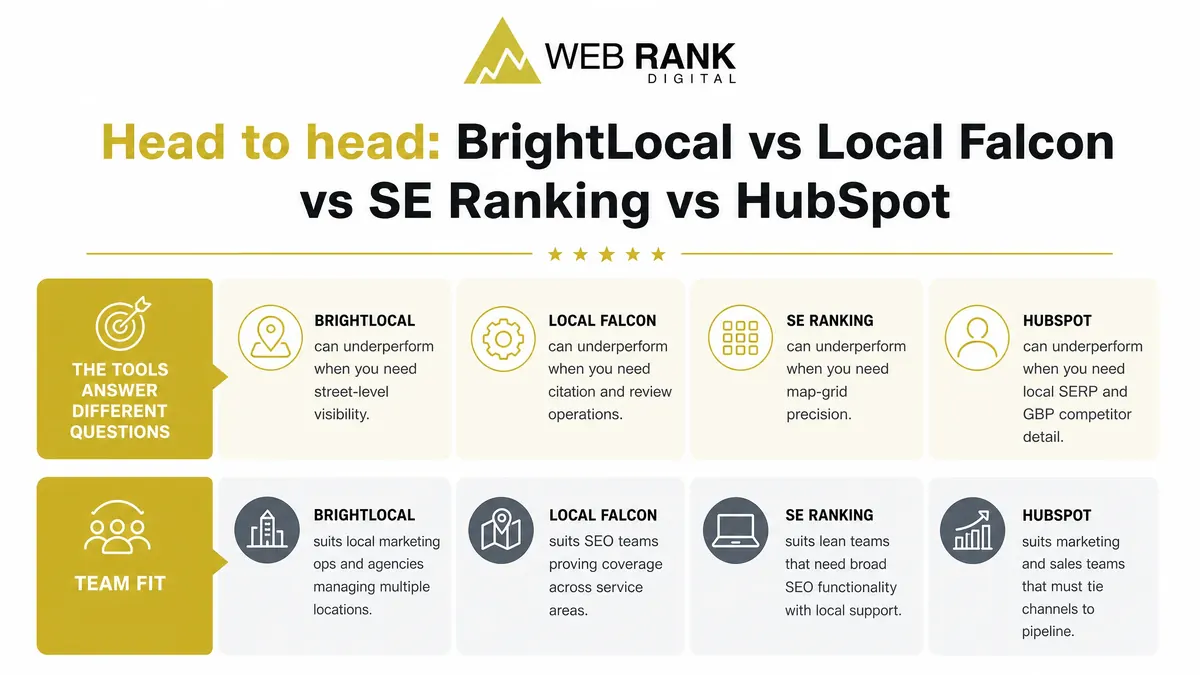
These tools answer different questions, so “does it work in my market?” depends on whether you need map-pack coverage, operational cleanup, competitive research, or closed-loop revenue. BrightLocal can underperform when you need street-level visibility; Local Falcon can underperform when you need citation and review operations; SE Ranking can underperform when you need map-grid precision; HubSpot can underperform when you need local SERP and GBP competitor detail.
Team fit: BrightLocal suits local marketing ops and agencies managing multiple locations; Local Falcon suits SEO teams proving coverage across service areas; SE Ranking suits lean teams that need broad SEO functionality with local support; HubSpot suits marketing and sales teams that must tie channels to pipeline.
BrightLocal strengths for local ops
BrightLocal is strongest when your market is lost in the basics: inconsistent citations, unmanaged reviews, and unclear GBP positioning versus nearby competitors.
You get practical operational levers that move local trust signals and keep reporting consistent across locations and clients.
- Citations audits and submissions: find mismatched NAP details and push fixes via Citation Builder (pay-as-you-go per citation) when scale matters
- Review monitoring and reporting: centralize review tracking and roll it into client-ready or location-ready reporting
- GBP competitor comparisons: side-by-side checks that help you explain why a rival is winning on profile completeness and engagement
Local Falcon strengths for map grids
Local Falcon wins when you need proof that rankings shift block by block, not just “you rank #3 in the city.” That is often the difference between a tool that feels accurate in your market and one that feels disconnected.
It is built for geo coverage validation and competitor visibility across a service area.
- Geo grid rank visibility: geo-grid rank tracking on customizable grids (3×3 up to 21×21) to show where you actually appear
- Before after campaign snapshots: capture scans pre and post GBP or content changes to show movement without hand-waving
- Multiple points of presence checks: compare performance across neighborhoods, suburbs, or multiple storefronts without pretending one zip code equals the whole market
SE Ranking strengths on a budget
SE Ranking is the value play when you need one platform to cover rankings, onsite priorities, and competitor research without enterprise pricing.
It is less “map-grid specialist,” more “do a lot well” for small teams.
- Rank tracking with local focus: daily keyword tracking that can be organized by location and project
- Site audit and on page tasks: turn findings into a prioritized task list your team can actually execute
- Competitor keyword research: identify what competitors rank for that you do not, then filter to the terms that look like buyers, not browsers
HubSpot strengths for revenue attribution
HubSpot is the best choice here when the real question is, “which competitor-driven moves produced leads and revenue?” not just “did we rank.”
For teams with longer sales cycles, HubSpot’s revenue attribution can connect marketing touches to deals, including Contact Create Attribution, Deal Create Attribution, and Deal Revenue Attribution (Enterprise constraints apply).
- CRM pipeline and lead tracking: see which locations, services, and sources are creating deals, not just clicks
- Email and ads integration: keep campaigns tied to contacts and lifecycle stages so reporting reflects reality
- Sales enablement reporting: measure what sales uses and what closes, so marketing does not optimize for activity instead of outcomes
The 30 minute test we run before we commit
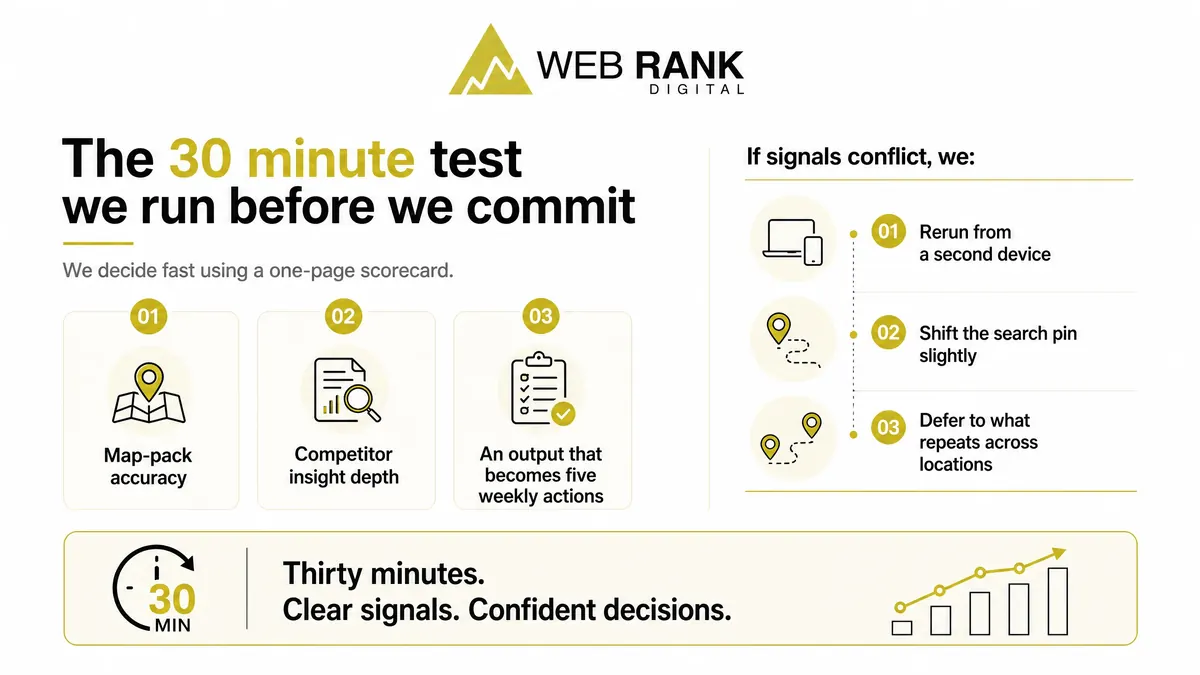
We decide fast using a one-page scorecard: map-pack accuracy, competitor insight depth, and an output that becomes five weekly actions. If signals conflict, we rerun from a second device, shift the search pin slightly, then defer to what repeats across locations.
Map pack reality check
In 30 minutes you should see whether the tool reflects how customers actually find you locally, not a single “best rank.” We run quick spot checks that expose proximity effects and day-to-day swings.
We test three high-intent keywords from your doorstep, then rerun from three nearby neighborhoods. If rankings flip hard between those points, the tool must show that volatility clearly, or it will mislead your priorities.
- 3 keywords searched from near your address (service + city, service “near me”, emergency variant)
- 3 nearby neighborhoods you sell into (one close, one mid-range, one edge of service area)
- Note swings: who enters the top 3 as the pin moves, and which competitors only win “close to home”
Competitor proof points to capture
Actionable competitor intelligence shows why they win, not just that they win. In the same 30 minutes, you should be able to pull proof points you can act on this week.
- Google Business Profile: primary category plus key attributes that match your services
- Review velocity: new reviews added in the last 90 days, not just total count
- Top landing pages and offers tied to map-pack clicks (service pages, location pages, promos)
When we want execution, not another dashboard
When you do not have time, DIY tools fail in the same place: they show movement, but they do not drive weekly execution. Web Rank Digital National Customer Accelerator is built for managed local competitor tracking, so you get a short set of weekly priorities tied to outcomes like map pack coverage and lead-driving keywords, not a backlog of “interesting” alerts. It also scales cleanly across service areas and multi-location footprints, so each territory gets its own competitive picture without multiplying your workload.
Reporting is built for decisions: what changed, why it matters, what we do next.
Turn competitor moves into five actions you can ship this week
If you want more calls and booked jobs, your competitor analysis has to do more than collect data. You need weekly clarity on where you are losing map pack visibility, which keywords and pages competitors are winning with, and which backlinks are moving the needle in your service area.
That is exactly what we deliver inside the National Customer Accelerator using our Competitor Analysis System. We start with your local map pack and organic competitors, run competitive gap analysis across keywords, content, and backlinks, then set up real-time monitoring so you see meaningful competitor moves without alert fatigue. You get actionable playbooks and shareable reports your team can execute.
Book a demo and ask us for a sample competitor gap report for your exact service area and priority keywords. If you want execution support, request Local SEO by Web Rank Digital so we can turn the intel into measurable map pack and organic improvements.
Frequently Asked Questions
How do you track your competitors?
You track the competitors that show up in your map pack and organic results for your highest-intent keywords, then monitor their ranking changes, new content, and backlink gains on a weekly cadence. With our Competitor Analysis System, you can set real-time monitoring alerts that surface only meaningful moves and tie them to a short action list.
How do you do competitor analysis?
Start by selecting 3 to 5 competitors from the map pack and organic results, then run keyword gap identification, content gap analysis, and backlink gap analysis to find what they have that you do not. Prioritize the top opportunities by likely lead impact, then revisit weekly using monitoring and alerts so you act on trends, not noise.
How is competitor analysis different from tracking my own rankings?
Tracking your rankings tells you where you stand, but competitor intelligence tells you why you are losing and what to do next. A Competitor Analysis System focuses on gap detection across keywords, content, and backlinks so you can close the specific gaps that are driving competitor visibility.
Can competitor analysis help with local ‘near me’ search visibility?
Yes, because it shows which high-intent local terms competitors are winning, where they are showing in the map pack across your service area, and what supporting content and links are contributing. That insight helps you prioritize the few changes most likely to improve map pack performance and local organic visibility.
How often should I review competitive gaps?
Run a deeper competitive gap analysis monthly, then use weekly monitoring to catch meaningful competitor changes like new pages, sustained rank gains, or new backlinks. Avoid reacting to every fluctuation and focus on repeatable signals that consistently precede lead growth.