The best all-in-one customer acquisition software for your local business is the one that improves local search visibility, automates the right funnel, and proves ROI through tracked customer actions like calls, form fills, website clicks, and direction requests.
Here’s what matters most when you choose an all-in-one platform:
- Start by defining the customer actions you need to generate and track: calls, clicks, directions, form fills.
- Diagnose your local visibility gap with competitor benchmarking across your real service areas.
- Match software to a funnel that moves local discovery to booked jobs, not just web traffic.
- Prioritize onboarding quality and a 90-day adoption plan over extra features.
- Require performance reporting that ties visibility changes to completed customer actions.
- If you manage multiple locations, insist on roll-up reporting and location-level comparisons.
At Web Rank Digital, we built our National Customer Accelerator for local teams that need competitor analysis, automated customer funnels, and customer action tracking in one system, plus performance reporting you can actually use. We have spent 15+ years helping 1000+ businesses scale local growth, and we see the same pattern: fast results come from tight visibility diagnostics, clean attribution, and real onboarding support. If you want hands-off execution, our Done For You program adds ongoing Google Business Profile content, FAQ generation, and review reply management alongside the platform. We’ll start with Web Rank Digital National Customer Accelerator because it combines competitor analysis with customer-action attribution, so you can see exactly where you are losing local demand and what to fix first.
1. Web Rank Digital National Customer Accelerator
If you need customer acquisition software that proves ROI in local markets, Web Rank Digital’s National Customer Accelerator sets the benchmark: you see where competitors win, launch automated customer funnels fast, and tie outcomes to real customer actions. The platform’s competitor analysis system tracks ranking and content gaps you can actually prioritize, then routes that demand into prebuilt funnels with segmentation and A/B testing. Reporting stays grounded in conversion signals, including calls, website clicks, and direction requests.
It fits best when you manage multiple locations or service areas and need consistent attribution and onboarding support across every market.
2. HubSpot Marketing Hub plus Sales Hub
HubSpot Marketing Hub plus Sales Hub is a strong fit when you need your CRM and marketing automation tightly connected, so you can see which campaigns create leads and how those leads move through your pipeline. The “paying for features you will not use” risk is real here because pricing scales quickly (and Professional adds a mandatory onboarding fee), so you need to be confident you will actively use automation, lead scoring, and lifecycle reporting.
The tradeoff for local pros is that local SEO, Google Business Profile workflows, and maps-first attribution are not core strengths, so you often end up stitching together extra processes to prove which local actions drove revenue. It is best for inbound-led teams publishing content consistently and nurturing leads over time, not teams whose growth depends primarily on local discovery and GBP execution.
3. Keap
Keap is a strong fit when you need SMB-friendly automation tied directly to a sales pipeline, so leads do not sit in inboxes. You can consolidate quote requests, follow-up sequences, appointment prompts, and deal stages in one place, which helps your team stay consistent without adding headcount.
The tradeoff for local pros is that Keap is not built for native local visibility benchmarking or rank tracking, so you will still need a separate way to measure local search performance.
Keap fits best for service businesses that win on fast estimates and disciplined follow-up after the quote.
4. Brevo
Brevo is a cost-conscious pick when your priority is running coordinated email plus SMS workflows without paying for a lot of enterprise weight you will not use. In our experience, it works best when you have clear promo windows and simple retention sequences, so you can measure impact in replies, redemptions, and repeat visits. The tradeoff is local discovery: Brevo is not built for Google Business Profile optimization, map visibility, or competitor benchmarking, so you still need a separate local search workflow to drive new demand consistently.
5. Birdeye
Birdeye wins when your local acquisition is reputation-led: you can drive more conversions by consistently generating reviews, keeping listings accurate across directories, and responding fast via messaging from one place. It sits firmly in the category of reputation management platforms, and that focus is the strength. The tradeoff is funnel depth: its templates and outcomes vary a lot by how your locations, tracking, and intake flow are set up, so you may need augmentation for full customer-action attribution.
Best fit is reputation-driven industries like home services, dental, and multi-location retail.
6. Local Falcon
Local Falcon is built for one job: diagnosing your Google Maps visibility with geo-grid ranking scans, so you can see exactly where you show up across a neighborhood, not just in a single ZIP code. That grid view is the strength, especially for isolating map rank swings and competitor pockets during SEO audits. The tradeoff is simple: it is analytics-first, not a funnel platform, so it will not capture leads, automate follow-up, or tie rankings to calls and direction requests.
It fits best for SEO teams and agencies running location-by-location audits and reporting.
7. Housecall Pro
Housecall Pro earns its spot when your bottleneck is operational speed, not lead attribution. You can get value quickly because the core workflow is straightforward: schedule jobs, send estimates, and collect payments without stitching together multiple tools. That said, it is not built to be your primary local SEO or local visibility engine, so it will not tell you which channels actually drove booked work.
It fits best for home service operators who want the office and field team running tighter, then pair it with a customer acquisition platform like our National Customer Accelerator for tracking what creates demand.
8. JobNimbus
JobNimbus is strongest when you already have leads and need a contractor-focused system to move them from estimate to signed job with clean follow-up. In our experience, it fits sales workflow and production handoffs better than it fits top-of-funnel local discovery. The tradeoff is that it is not built to benchmark your local visibility against competitors or quantify market share shifts from search and maps.
It is typically a best fit for roofing and other exterior trades that want tight pipeline control and job-stage accountability.
9. Zoho CRM plus Zoho Marketing Automation
Zoho CRM plus Zoho Marketing Automation can cover a lot of ground for an SMB because you can mix-and-match a broad suite without paying enterprise-level pricing. The real risk is time: clean action attribution only shows up after you configure fields, lifecycle stages, lead sources, and the CRM-to-automation sync rules tightly enough that every form fill, call, or booked job lands in the right bucket. This is best for ops-heavy SMBs that can assign an owner to ongoing setup and data hygiene.
10. Salesforce Sales Cloud plus Marketing Cloud
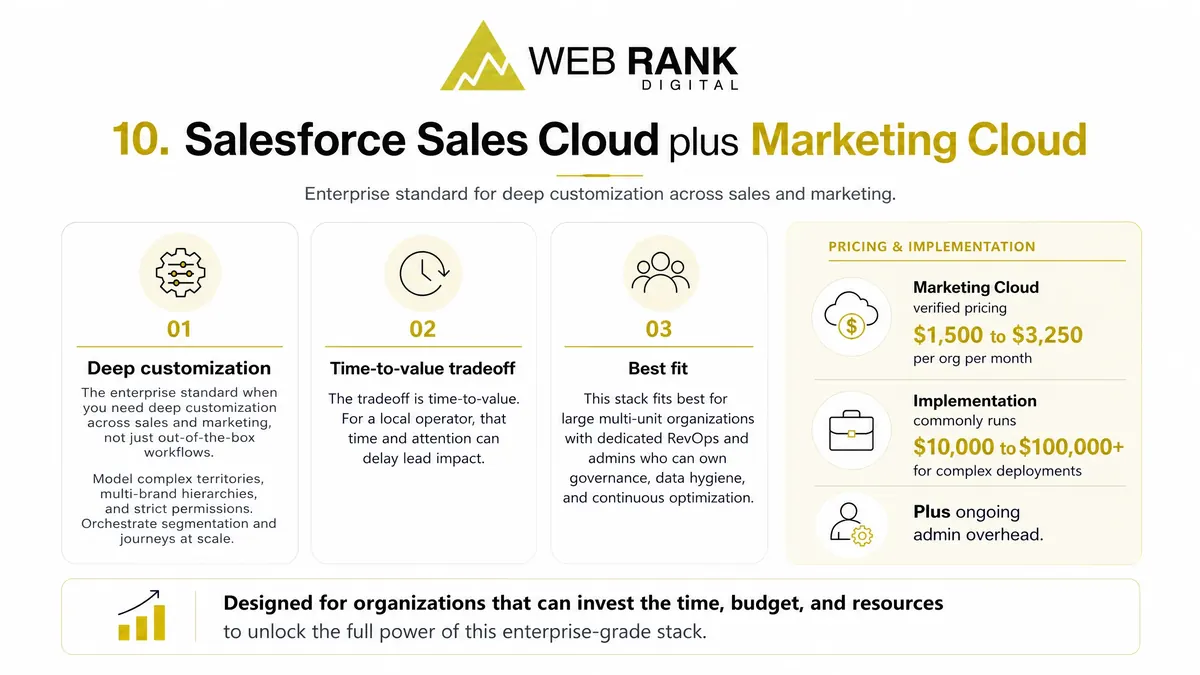
Salesforce Sales Cloud plus Marketing Cloud is the enterprise standard when you need deep customization across sales and marketing, not just out-of-the-box workflows. You can model complex territories, multi-brand hierarchies, and strict permissions, then orchestrate segmentation and journeys at scale.
The tradeoff is time-to-value. Verified pricing puts Marketing Cloud at $1,500 to $3,250 per org per month, and implementation commonly runs $10,000 for basic setup to $100,000+ for complex deployments, plus ongoing admin overhead. For a local operator, that time and attention can delay lead impact.
This stack fits best for large multi-unit organizations with dedicated RevOps and admins who can own governance, data hygiene, and continuous optimization.
11. ActiveCampaign
ActiveCampaign is a strong pick when your measurable win comes from tighter follow-up: better segmentation, better timing, and fewer leads slipping through the cracks. In our experience, its automation engine is the point, letting you route prospects by behavior and stage so lifecycle messaging stays consistent as volume grows. The tradeoff is clear: it does not create local discovery or visibility on its own.
It fits best when your funnel is nurture-heavy and you already have traffic to convert.
12. Mailchimp
Mailchimp is strong when you need to ship an email fast. You get proven templates, quick list sends, and lightweight automation without paying for a stack you will never fully adopt. The tradeoff is acquisition proof: you will see opens and clicks, but tying a specific campaign to inbound phone calls is limited, so ROI gets fuzzy for call-driven local pros.
Best fit is simple, repeatable touches like monthly newsletters, seasonal promotions, and reactivation offers to past customers.
13. Klaviyo
Klaviyo is a top choice when your growth depends on retention and repeat purchases, because its strength is ecommerce lifecycle messaging tied to customer behavior. You can build flows around browsing, cart activity, first purchase, and re-order windows so your online store drives predictable follow-up revenue. The tradeoff is that local acquisition actions like Google Maps visibility, calls, and direction requests are not its core lane.
It fits best when you run retail locally but also sell online, and we often pair Klaviyo with National Customer Accelerator for local search visibility and customer action tracking.
14. Podium
Podium earns its spot when your priority is converting inbound leads fast, not improving how often you show up. Its strength is text-first follow-up: you reduce missed calls, keep the conversation moving, and close more jobs by meeting customers where they respond quickest.
The tradeoff is scope. Podium does not replace local search visibility work or a competitor analysis system, so you will still need separate tooling if rankings, market share shifts, and content gaps are part of your acquisition plan.
It fits best in high call volume locations where every unanswered ring is revenue leakage and speed-to-response is the main lever.
15. CallRail
CallRail is a critical attribution layer when phone calls are the conversion you care about. It uses call attribution technology to tie calls, texts, and even form submissions back to the marketing source, and it adds practical routing so the right lead hits the right team member fast. The tradeoff is simple: it does not execute local SEO for you, so you still need a system to drive local visibility and demand.
It fits best for service businesses where most revenue starts with a call.
16. Google Business Profile
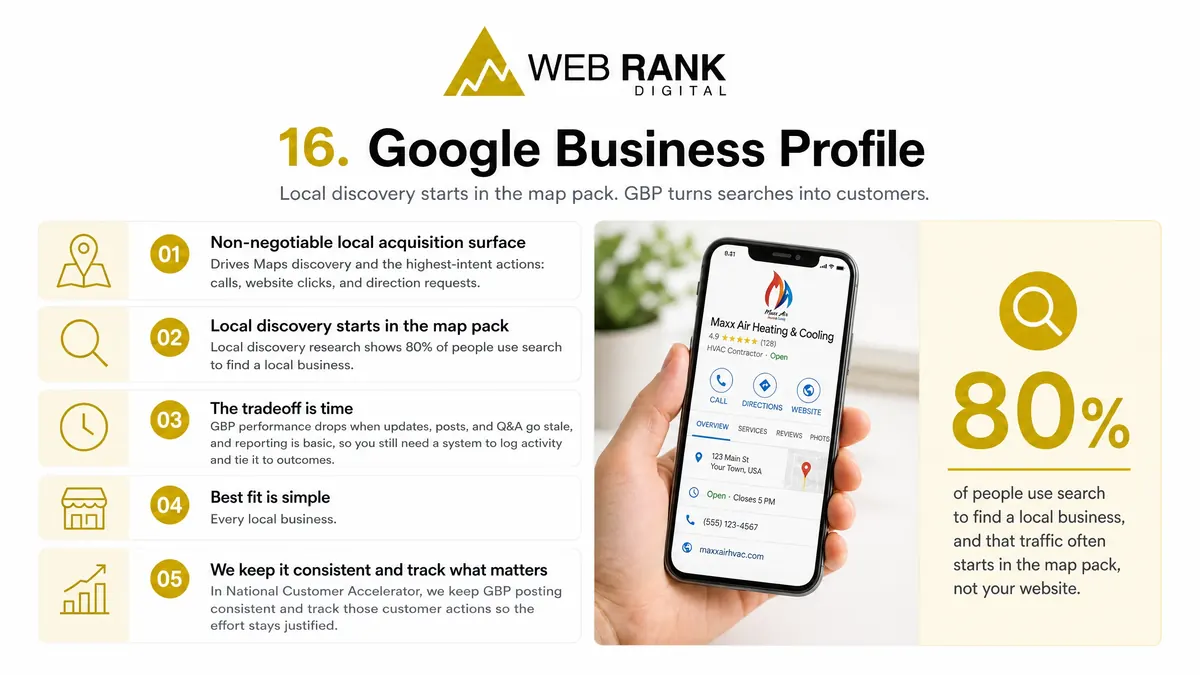
Google Business Profile is the non-negotiable local acquisition surface because it drives Maps discovery and the highest-intent actions: calls, website clicks, and direction requests. local discovery research shows 80% of people use search to find a local business, and that traffic often starts in the map pack, not your website.
The tradeoff is time. GBP performance drops when updates, posts, and Q&A go stale, and reporting is basic, so you still need a system to log activity and tie it to outcomes.
Best fit is simple: every local business. In National Customer Accelerator, we keep GBP posting consistent and track those customer actions so the effort stays justified.
17. Google Analytics 4
Google Analytics 4 is strong at measuring your on-site journey: which channels drive sessions, what pages people view, and which events fire before a form submit. The tradeoff is offline visibility. Without extra setup, GA4 will not reliably tell you which campaign produced a phone call, a walk-in, or a direction request that turned into revenue.
GA4 fits best when your site has clear, intentional events (forms, key clicks, bookings) and you want clean web conversion reporting.
18. Looker Studio
Looker Studio is strong when your main problem is dashboard consolidation. You can pull multiple sources into one view and standardize what your team sees week to week. The tradeoff is that it only reports what your sources provide, so fragmented tagging, inconsistent naming, or duplicate conversions will still produce misleading attribution.
It fits best when you need multi-source reporting across analytics, ads, and call or lead systems, and you are prepared to clean and govern the inputs first.
19. Wix
Wix is a strong choice when you need a fast site or single-purpose landing pages that load quickly and let you publish changes without waiting on a developer. That matters because your website is a conversion surface: it should turn existing demand into calls and form fills, not pretend to be your acquisition system.
The tradeoff is you can end up paying for site features you never use while still lacking the local acquisition depth that drives measurable customer actions. Wix is best when your goal is a simple web presence and you plan to run local visibility, funnels, and action tracking in a dedicated customer acquisition platform like National Customer Accelerator.
20. Squarespace
Squarespace helps you launch polished pages fast, with templates that look premium and basic commerce that is “good enough” for simple product catalogs, gift cards, or taking payments. Where it falls short for acquisition is local benchmarking: you do not get deep competitor comparisons or clear attribution to the customer actions that matter locally. Use it when your brand presentation is the priority, then layer local visibility and action tracking elsewhere so you can prove what actually drove calls, clicks, and direction requests.
21. WordPress plus a form plugin
WordPress plus a form plugin can keep your setup time reasonable, but treat it as infrastructure, not customer acquisition software. The upside is flexibility and strong SEO control, which matters when you are publishing service pages, location pages, and ongoing content to win content-heavy local SEO. The tradeoff is tool sprawl: hosting, themes, plugins, analytics, and form routing can turn into a maintenance job and a tracking blind spot.
In our experience, it fits teams that can own content cadence and basic technical upkeep.
22. Shopify
Shopify is built to turn product demand into transactions fast, with a mature commerce conversion stack that covers storefront, checkout, payments, shipping, and order workflows. For local retailers expanding online, the tradeoff is that “near me” behaviors are not the core motion: calls and driving directions live outside the platform and need separate tracking. Shopify fits best when you have real inventory to move, need clean product feeds, and want your online store to become a dependable revenue channel, not just a brochure.
23. Meta Business Suite
Meta Business Suite is a practical pick when a meaningful share of your leads start on Facebook or Instagram. You get a unified inbox for inbound DMs and comments, plus basic organic scheduling so you can keep posts consistent without extra tooling.
The tradeoff is measurement. Meta’s reporting is fine for on-platform activity, but closed-loop attribution to real customer actions (calls, form fills, booked jobs, offline revenue) is weak unless you build a broader tracking layer around it.
Best fit: social-led lead sources where speed-to-respond in the inbox drives conversions, and you are comfortable treating it as a channel manager, not a full-funnel attribution and local visibility platform.
24. Google Ads
Google Ads is the fastest way to capture existing demand because you show up when someone is already searching for your service. It is an accelerator, not a foundation: costs can swing week to week as competitors bid up keywords, and ROI only holds when your landing page, conversion tracking, and follow-up are tight. In our experience, it fits best when your lifetime value can absorb higher cost per lead, like recurring home services, multi-location operators, or high-ticket projects.
Use National Customer Accelerator to prove impact with customer action tracking and attribution, not clicks.
25. Zapier
Zapier is the glue for a fragmented stack: it connects disconnected tools so you can move leads, notifications, and data without custom development. That said, integrations are not an all-in-one operating system. In practice, Zaps get brittle as your processes change, and the upkeep is easy to underestimate: broken triggers, renamed fields, auth resets, and task limits quietly demand attention.
The best fit is light automations and clean handoffs, like pushing a form fill into a spreadsheet, pinging your team, or creating a follow-up task while your core customer action tracking lives in one system.
Turn Local Visibility Into Trackable Customer Actions
If you want to stop paying for reports that do not translate into booked work, you need one system that ties local visibility to real customer actions. We built the National Customer Accelerator to do exactly that, with competitor analysis, automated customer funnels, and performance reporting that tracks calls, form leads, website clicks, and direction requests using Rankly.
Book a demo with us at Web Rank Digital and ask for a local competitor analysis inside the platform, plus a first 90-day plan tied to the customer actions you care about. If you do not have the bandwidth to run ongoing Google Business Profile activity, add our Done For You Program so your team stays consistent while we document completed actions and performance over time.
Frequently Asked Questions
How does automated customer funnels work in this software?
You start with a prebuilt funnel template, then we help you configure the offer, segmentation, and calls-to-action so it matches how customers actually buy in your local market. From there, you optimize with A/B testing and use attribution to see which touchpoints are producing tracked actions, not just traffic.
What metrics does the platform track to measure customer acquisition success?
You see local search visibility and engagement, including search views and maps views, plus the customer actions that matter operationally: phone calls, website clicks, and direction requests. The goal is to connect those actions back to your baseline and competitive benchmarks so you can defend ROI decisions with evidence.
Can this software handle multi-location or national service area businesses?
Yes. The National Customer Accelerator is built to support multi-location and wider service area businesses, with reporting and competitor tracking that can be segmented by region or location. Your subscription is configured based on the plan and seat or user requirements you need.